Coming soon to iPhone and iPad

The teleprompter that waits for your voice.

Your script scrolls in a narrow column right under the camera and keeps pace as you talk — pause, and it waits. Speech recognition runs on the device. Every take is kept as its own clip.

Coming soon to the App StoreSee how it works
  • No weekly plans
  • No watermark
  • No ads
  • No account

# Intro

Hi, I’m Sam. Today:

three quick tips for

filming yourself at home.

First, put the light

in front of you.

Following your voice150 wpm

Features

A teleprompter you can rely on — right where the others let you down.

Talkzy doesn’t try to win on AI features. It gets the basics solid: the text keeps up with you, every take is kept, your setup is remembered, and the price is fair.

  • Voice-follow (beta)

    Talk at your own pace and the text keeps up; pause and it waits. Talkzy matches what you say against your own script, so an ad-lib or a skipped line doesn’t throw it off — and in a noisy room it keeps your pace instead of freezing.

  • Read right under the lens

    The script runs in a narrow column next to the front camera, so your eyes stay on your viewers. Set the speed in words per minute, the text size, the margins and the reading line.

  • Every take kept

    Each take is its own file, named after your script, listed with a still and its length, and can go straight into an album in Photos. Retake from where you stopped or from the start of the section.

  • Interrupted takes rescued

    Talkzy killed, crashed or out of battery mid-take? The next launch reads the file back and adds the take to your list, marked Recovered. At most the last ~2 seconds are lost.

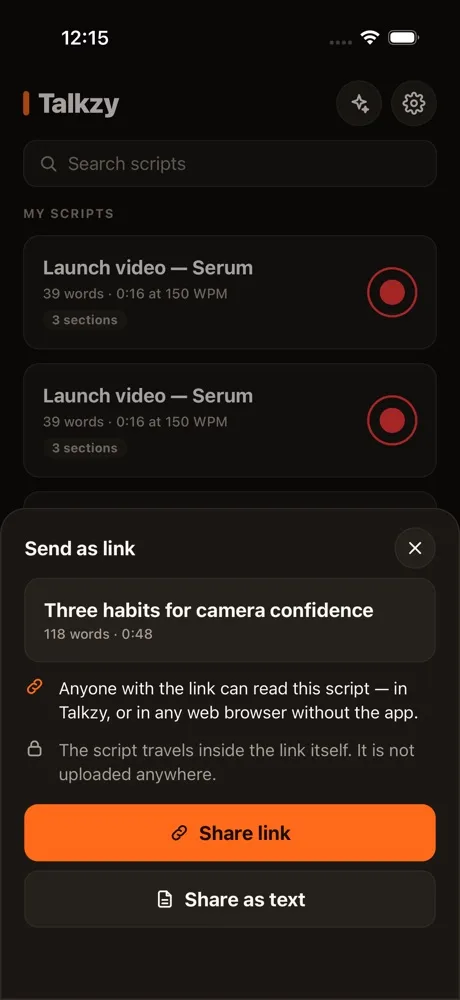
  • Send a script as a link

    Whoever gets it reads it in their browser with a web teleprompter — no app needed; anyone with Talkzy can add it to the app. The script travels inside the link and is never uploaded. Free.

    Try the web teleprompter
  • Know how much is left

    The prompter shows the time left and an end card when the script runs out. On iPhone, a light tap marks a take starting and stopping, the countdown and a section jump.

  • Prompter-only mode and mirror

    Full-screen text for a second device or a beam-splitter rig. Mirror left–right and upside down, very large type, and the screen stays awake.

  • Sections for livestreams

    A line starting with # begins a section — one per product. Jump between sections and loop the script for a long live.

  • Remotes

    Bluetooth keyboards, page-turners and ring remotes; with the camera open, the volume buttons and Camera Control start and stop a take. Free, always.

  • Your setup, remembered

    Speed, font, margins, mirror, mode and position are kept per script; camera, frame rate and mic are kept per device.

  • A fair price

    The free version is a complete teleprompter. Pro is yearly, monthly or a one-time Lifetime — never a weekly plan.

  • Private

    No account, no ads, no tracking across apps. Your scripts and videos stay on your device.

Three steps to your first take

No account, and no connection needed to read and record.

  1. 01

    Paste your script

    Paste, type, or import a .txt, .md or .rtf file. Start a line with # to split it into sections. Talkzy estimates the read time at your speed.

  2. 02

    Choose how it scrolls

    Follow your voice, a fixed speed, or only when you drag or press a remote. Set the text size, margins and countdown.

  3. 03

    Look at the lens and talk

    Record with the front or back camera, or use prompter-only mode next to your livestream phone. Every take becomes its own clip.

Inside the app

Captured from the running app

Every image below is a capture of the running app (and of the web teleprompter in Safari), with a sample script.

02/Web teleprompter

Open the link and read. No app needed.

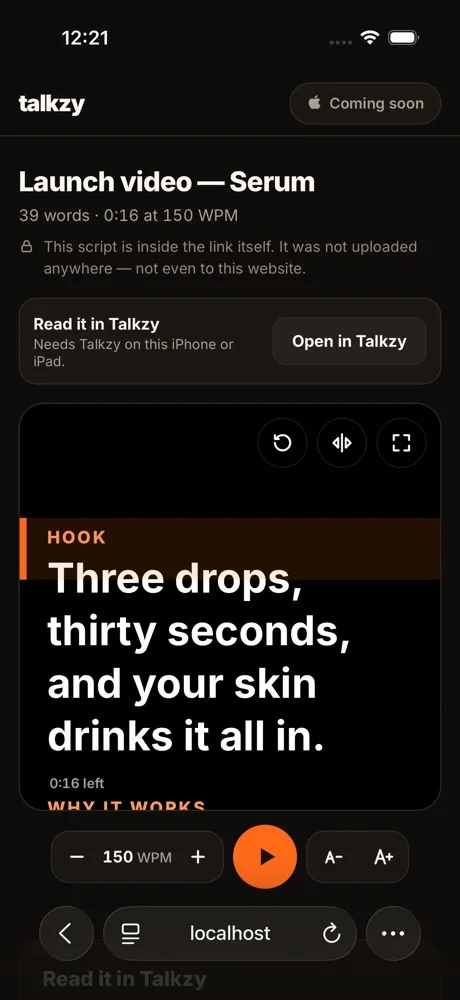
The link opens a teleprompter right in the browser. The text runs at the speed you set, with the time left and an end card. On iPhone and iPad, a button opens the script in Talkzy.

  • Play, pause, speed and text size
  • Mirror and full screen, with keyboard shortcuts
  • The script is unpacked on the reader’s own device
Try it with a sample script
Screenshot of Talkzy’s web teleprompter in Safari on iPhone, with a sample script

03/Prompter

Know how much is left, and when you’re done.

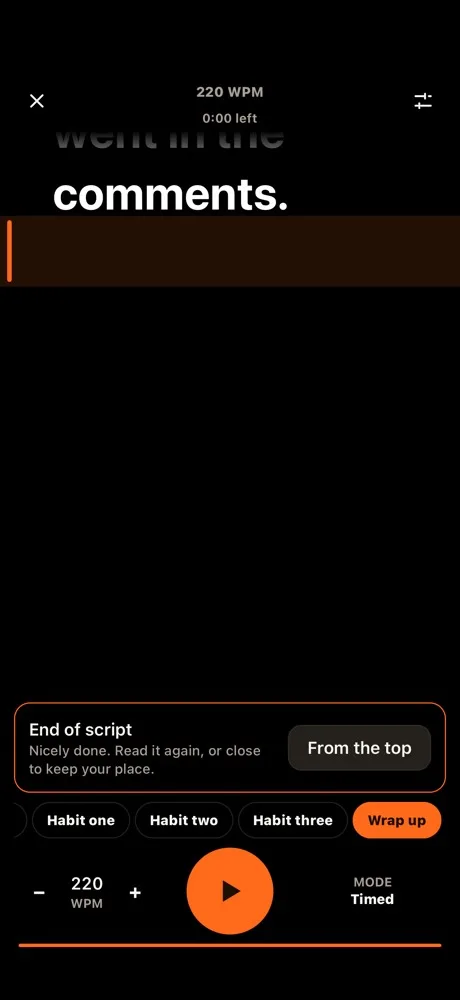
While you read, Talkzy shows the time left at your speed. When the script runs out, an end card offers to read it again from the top — or to stop recording during a take.

  • Time left at the top of the screen
  • From the top in one tap
  • On iPhone, a light tap when a take starts and stops, on the countdown and on a section jump
Talkzy’s prompter at the end of a script: the End of script card with a From the top button, and 0:00 left at the top

04/Takes

Talkzy closed mid-take? The take is still there.

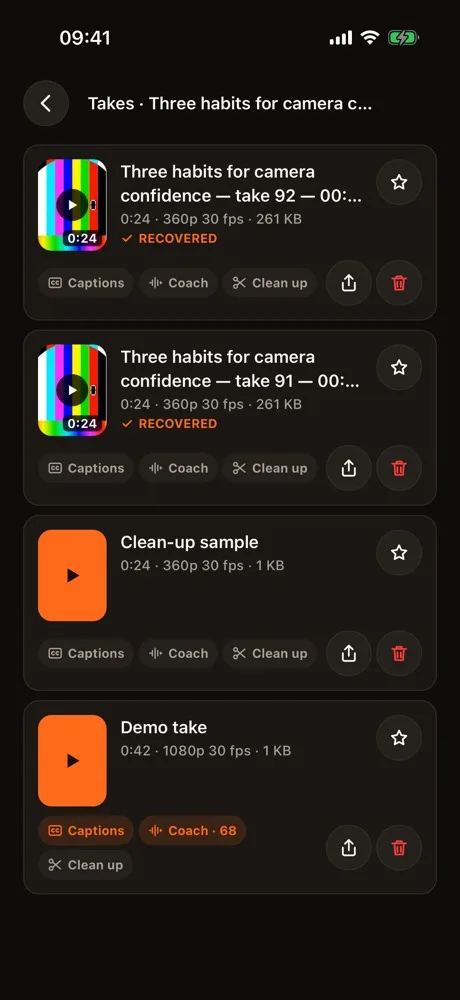
Talkzy writes every take in 2-second pieces. If the app is killed, crashes or the battery dies while you record, the next launch reads the file back and adds the take to the script’s list.

  • At most the last ~2 seconds are lost
  • A rescued take is marked Recovered
  • Every take shows a still and its length
Talkzy screenshot: a script’s takes, each with a still (the simulator’s test pattern) and its length, two of them marked Recovered

Privacy

Your voice, your face and your script stay on your device.

Talkzy has no server of its own. The speech recognition that scrolls your script runs on the device, and the videos you record live in the app or in your Photos — there is no upload step. Only anonymous usage statistics leave the phone, and you can turn them off.

  • On-device speech recognition

    Talkzy uses only Apple’s on-device recognizers. Audio is never sent to a server, even when a connection is available.

  • Camera and mic only to record

    The camera and microphone are on only while the recording screen or voice-follow is open. Videos are saved on the device, and to Photos if you allow it.

  • No account

    No sign-up, no email, no password.

  • No ads, no tracking across apps

    No advertising SDK and no advertising identifier. Anonymous usage statistics (Google Analytics for Firebase) help us improve the app — turn them off in Settings. Purchase data goes through RevenueCat.

No weekly fees. Ever.

The big teleprompter apps charge $60–140 a year, often billed weekly. Talkzy is free for everything a teleprompter needs, and Pro costs a fraction of that.

Free

$0

  • Unlimited scripts, sections and file import
  • Timed and manual scroll, mirror, countdown
  • Remotes and prompter-only mode
  • 1080p recording, every take saved to Photos
  • 3 voice-follow takes a day
  • No watermark, no ads

Talkzy Pro

No trial that turns into a charge
  • Yearly

    $9.99

    Renews every year. Cancel anytime.

  • Monthly

    $1.99

    Renews every month. Cancel anytime.

  • Lifetime

    $14.99

    Pay once. Nothing renews. Launch price.

  • Unlimited voice-follow
  • 4K, 60 fps and HEVC recording
  • Loop and section jumps for livestreams
  • Bluetooth and USB-C mic choice

Yearly and Monthly are auto-renewing subscriptions billed to your Apple ID until you cancel (Settings › Apple ID › Subscriptions) at least 24 hours before the renewal date. Lifetime is a one-time purchase. There is no weekly plan and no free trial. Prices are in US dollars and vary by country; the App Store shows the exact price before you confirm.

Frequently asked questions

Does voice-follow need an internet connection?

No. Talkzy uses only Apple’s on-device speech recognition and never sends audio to a server. It is in beta: it works best with a clear voice and a close mic, and when the room is too noisy it scrolls at your pace instead of freezing.

How does it work for a livestream?

Put a second iPhone or iPad next to your live phone and open prompter-only mode. Write each product as a section starting with #, jump between sections with a page-turner or keyboard, and loop the script for a long live. Talkzy doesn’t stream itself — it is the prompter beside your stream.

What does the free version include?

A complete teleprompter: unlimited scripts, timed and manual scroll, mirror, remotes, prompter-only mode and 1080p recording, with no watermark. Voice-follow is free for 3 takes a day. Pro unlocks the rest.

Is there a free trial or a weekly plan?

Neither. The 3 free voice-follow takes a day let you try the main feature without a surprise charge. Yearly and Monthly renew until you cancel; Lifetime is a single payment.

Where do my takes go?

Each take is its own file in Talkzy, listed per script. If you turn it on, it is also saved to an album named after the script in Photos. Deleting a take in Talkzy leaves the copy in Photos.

What if Talkzy closes while I’m recording?

The take is still there. Talkzy writes it in 2-second pieces as you record, so if the app is killed, crashes or the battery dies, the next launch reads the file back and adds the take to your list, marked Recovered. At most the last ~2 seconds are lost.

Does someone I send a script link to need Talkzy?

No. The link opens a teleprompter in their browser that runs at a set speed. If they have Talkzy on iPhone or iPad, they can add the script to the app — only when they choose Add. The script travels inside the link, so it is not uploaded to this website or anywhere else; anyone with the link can read it, so send it only to people you mean to.

Does it work with a beam-splitter rig?

Yes. Prompter-only mode mirrors left–right and upside down, with a black background, very large white or yellow text, and control from a Bluetooth keyboard or page-turner. Mirror and remotes are free.

What do I need?

An iPhone or iPad on iOS 17 or later. 4K and 60 fps depend on your device’s camera.

See all questions →

Coming soon to iPhone and iPad.

Talkzy is being finished for the App Store. Questions or feedback before launch? Email me any time.

Coming soon to the App StoreSend feedback