How to practice a presentation at home with your iPhone
Published October 2, 2026 · 7 min read
To practise a presentation at home, read your talk out loud while timing it, film a full run-through on your iPhone, then watch it back for pace, filler words and eye contact and rehearse only the parts that went wrong. Talkzy, a teleprompter for iPhone and iPad, can scroll the script by following your voice, keep every rehearsal as its own take and, after each take, show your pace, filler words and long pauses.
Most people prepare a presentation by rereading the slides in their head, then discover on the day that the talk runs long, the opening wobbles and they say “so” every other sentence. Practising out loud, on camera, fixes all three. This guide is a simple plan that works with the apps already on your iPhone, for a class presentation, a pitch, a work meeting or a speech.
Why practise out loud instead of in your head?
Reading silently feels faster and smoother than speaking. Your eyes skip words your mouth can't, and the sentences that look fine on paper are often the ones you trip over. Saying the talk aloud, at full voice, shows you three things you can't see any other way:
- How long it really takes. Spoken presentations almost always run longer than people expect.
- Which sentences are hard to say. If you stumble on a phrase twice, rewrite it.
- Where you lose your place. Those are the transitions to strengthen, or the spots to keep a short note.
How do I time my presentation?
- 1Count the words of your talk. Notes, Pages and most word processors show a word count.
- 2Find your speaking pace: read a paragraph aloud for one minute and count the words. Many people land around 120–160 words per minute when presenting.
- 3Divide the word count by your pace to get the running time. A 1,200-word talk at 130 words per minute is about nine minutes.
- 4Leave room. Aim to finish a minute or so under your slot; pauses, questions and nerves all add time.
If the talk is too long, cut a whole example or point rather than speeding up. Talking faster is the first thing an audience notices. Our guide on words per minute goes deeper into measuring your pace.
How do I rehearse with only the apps on my iPhone?
You don't need special equipment. A practice session with built-in apps looks like this:
- 1Put your talk in Notes, with a blank line between parts, so you can see where each section starts.
- 2Open Clock › Stopwatch and time a first read-through out loud. Write the time at the top of the note.
- 3Record an audio run in Voice Memos and listen back on a walk. Your ears catch filler words and rushed endings that you never notice while speaking.
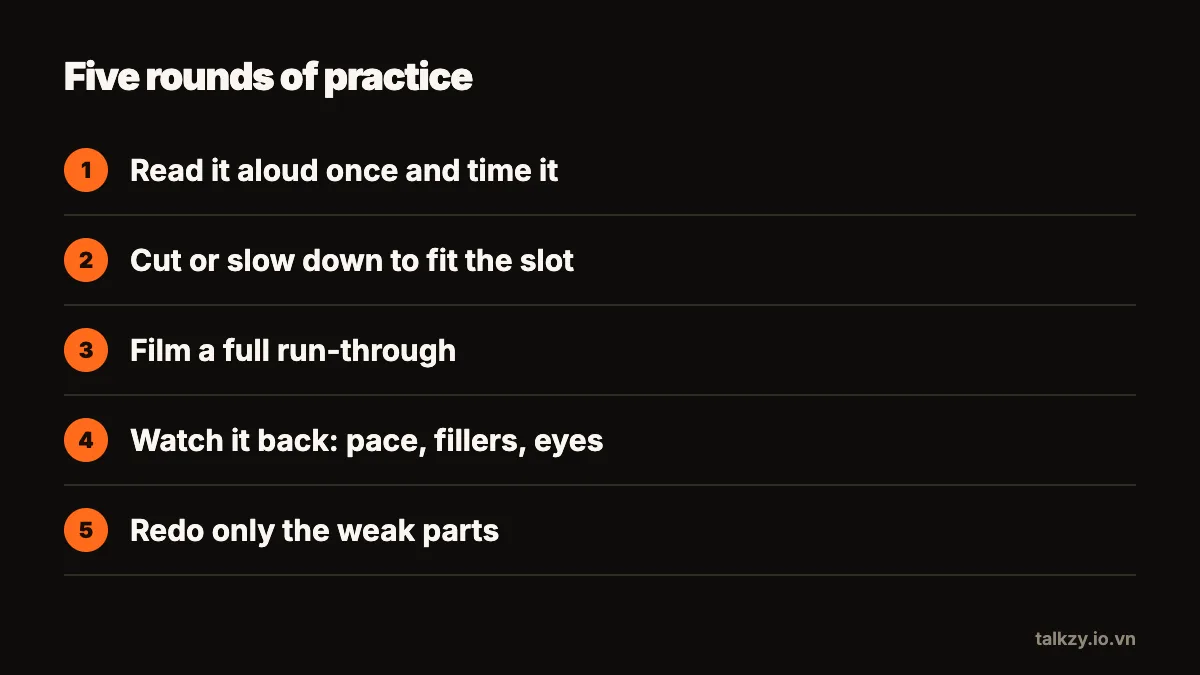
- 4Film a full run-through with the Camera app: front camera, phone at eye level on a stand or a pile of books, about an arm's length away. Stand if you'll stand on the day.
- 5If your slides are in Keynote, its Rehearse Slideshow option lets you practise with your slides, presenter notes and a timer on screen.
The weak spot of this setup is reading: holding the phone while you film, or glancing down at Notes, breaks eye contact and the scroll is up to you.
What should I look for when I watch myself back?
Watching yourself is uncomfortable for everyone. Make it useful by checking one thing at a time instead of judging the whole video:
- Pace: do you speed up when nervous, or rush the last sentence of each part?
- Filler words: count the “um”, “so” and “like”. A silent pause sounds far more confident than a filler.
- Pauses: do you stop to let an important point land, or run every sentence together?
- Eye contact: how often are you looking at the lens versus down at your notes?
- The first and last 30 seconds: they are what people remember. They should be your strongest, smoothest lines.
Write down two things to improve, not ten. Then record again.
How do I fix the weak parts without starting over?
Running the whole talk every time wastes your energy on the parts that are already fine. Practise in sections instead:
- Split the talk into parts — the opening, each main point, the close — and rehearse the shakiest part three times in a row.
- Learn the first and last lines by heart. With a strong start and a clean finish, the middle can be said in your own words. Our guide on memorising a script explains how much to learn.
- Practise the transitions: the sentence that moves you from one point to the next is where most people lose their place.
- Finish with one or two full run-throughs so the parts join up, ideally the day before, not the hour before.
| When | What to do | Time |
|---|---|---|
| 3–4 days before | Read aloud, time it, cut what doesn't fit | 30 min |
| 2 days before | Film a full run-through, watch it back, note two fixes | 30–45 min |
| The day before | Rehearse weak sections, then one or two full runs | 30 min |
| On the day | Say the first minute out loud once; no new changes | 5 min |
Where Talkzy helps
Talkzy turns the built-in setup into one screen, so you can rehearse looking at the lens instead of at your notes.
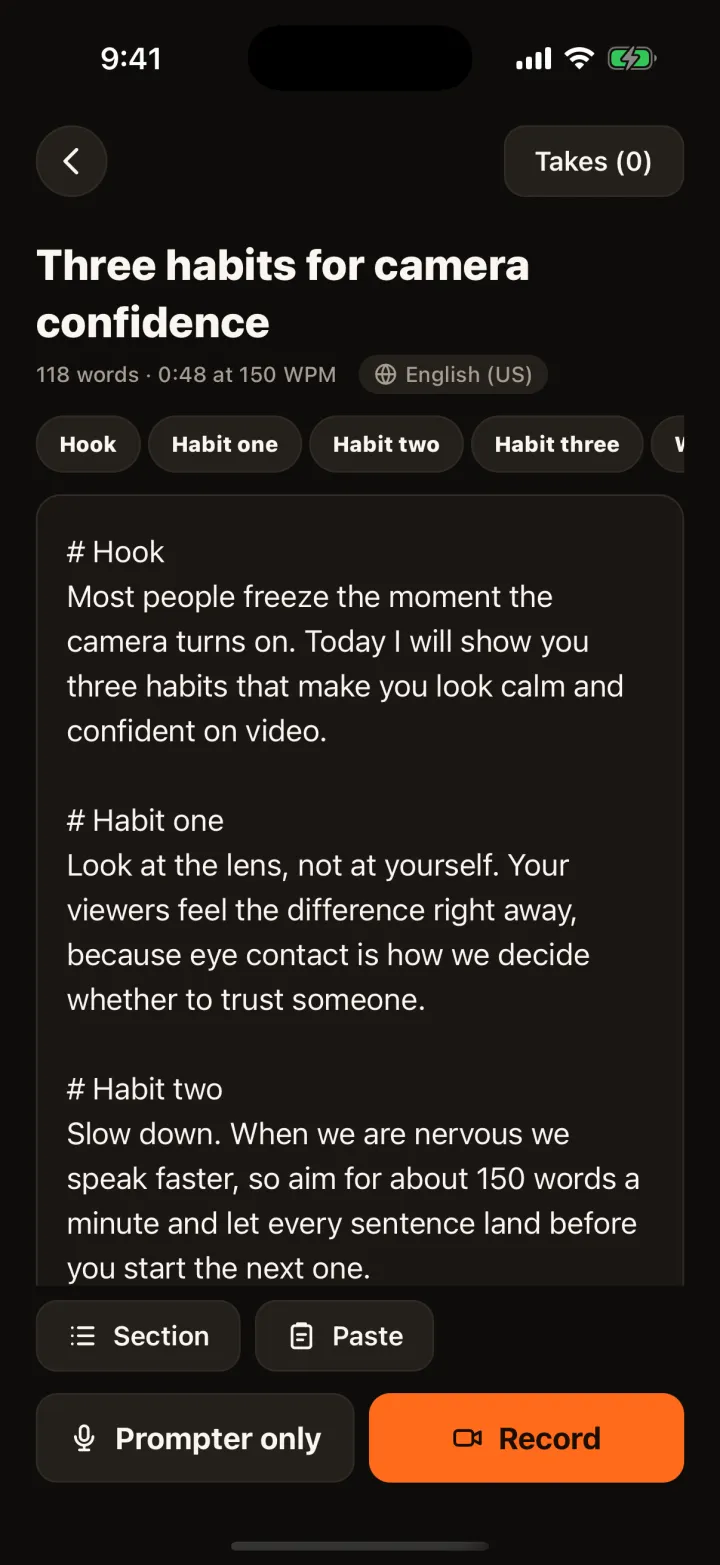
- Paste or import your talk and start a line with # for each part. The script list shows the word count and how long it takes at your speed, so you know right away whether it fits the slot.
- The script scrolls in a narrow column right under the front camera. With voice-follow it keeps your pace and waits when you pause; recognition runs on the device.
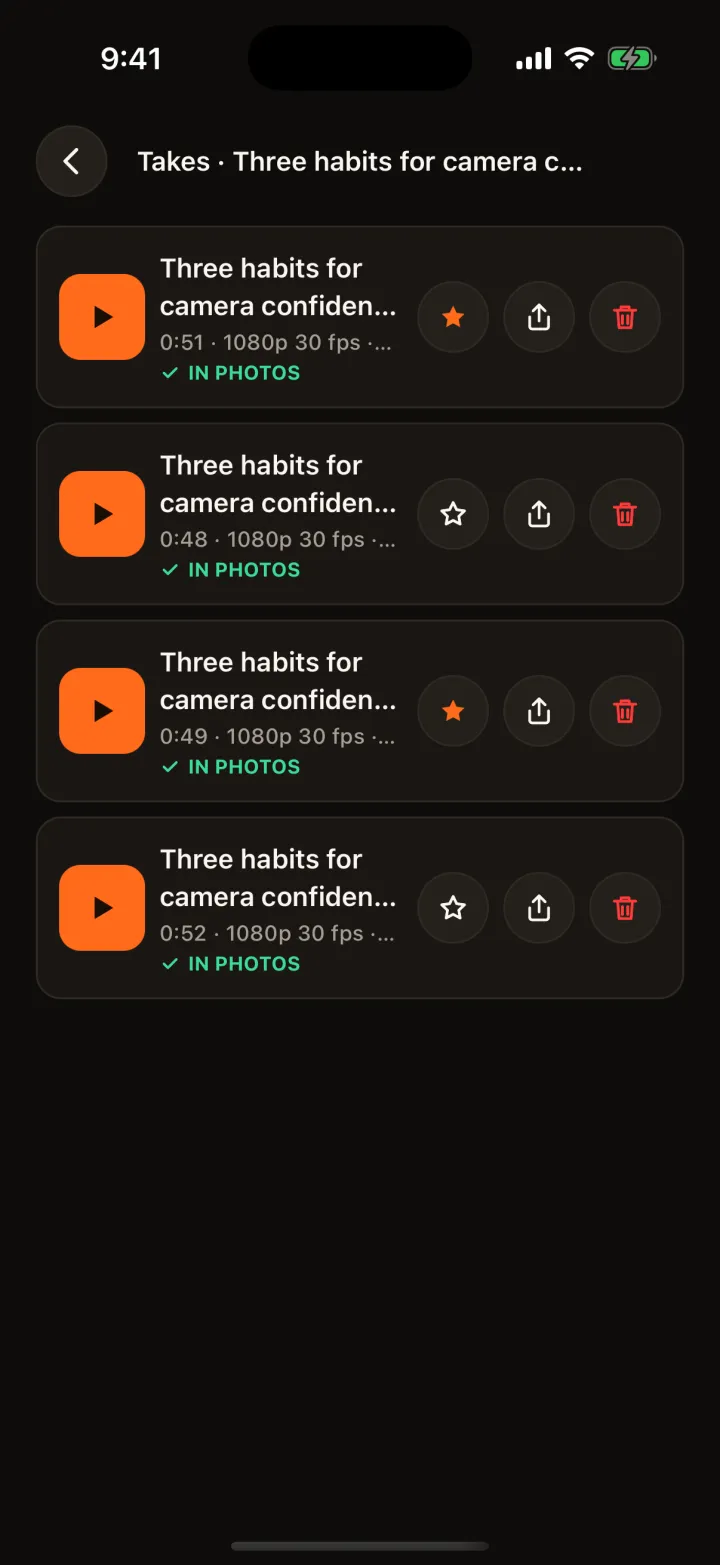
- Every run-through is saved as its own take. Mark the best one as a keeper, and after a stumble retake from where you stopped or from the start of the section.
- After a take, the speaking coach shows your words per minute, filler words, long pauses and how closely you followed the script, all on the device, with a simple score so you can see the trend.
- Rehearsing for a live talk? Prompter only mode shows the script full screen on an iPad or second phone, and a Bluetooth page-turner or keyboard can move through it — practise with the same clicker you'll use on the day.
How do I review my rehearsal takes?
Keep every attempt until you're done, and compare the first take with the last. Seeing the difference is the best cure for nerves. Delete the rest once you have the version you want to keep, or save the best one to Photos to send to a colleague or teacher for feedback.
Frequently asked questions
- How many times should I rehearse a presentation?
- Usually three to five full run-throughs out loud, plus extra practice on the opening, the close and any section you stumble on. More full runs past that point tend to make a talk sound recited rather than more confident.
- Should I memorise my presentation word for word?
- Rarely. Learn the first and last lines by heart and the order of your points; say the rest in your own words. A word-for-word talk is easy to lose if one sentence slips.
- Can I practise without filming myself?
- Yes. An audio recording in Voice Memos already shows your pace, filler words and pauses. Filming adds eye contact and body language, so try at least one filmed run before the real thing.
- Does Talkzy upload my rehearsal or script?
- No. Speech recognition for voice-follow and the speaking coach runs on your iPhone or iPad, and takes stay in Talkzy and, if you choose, in your Photos.